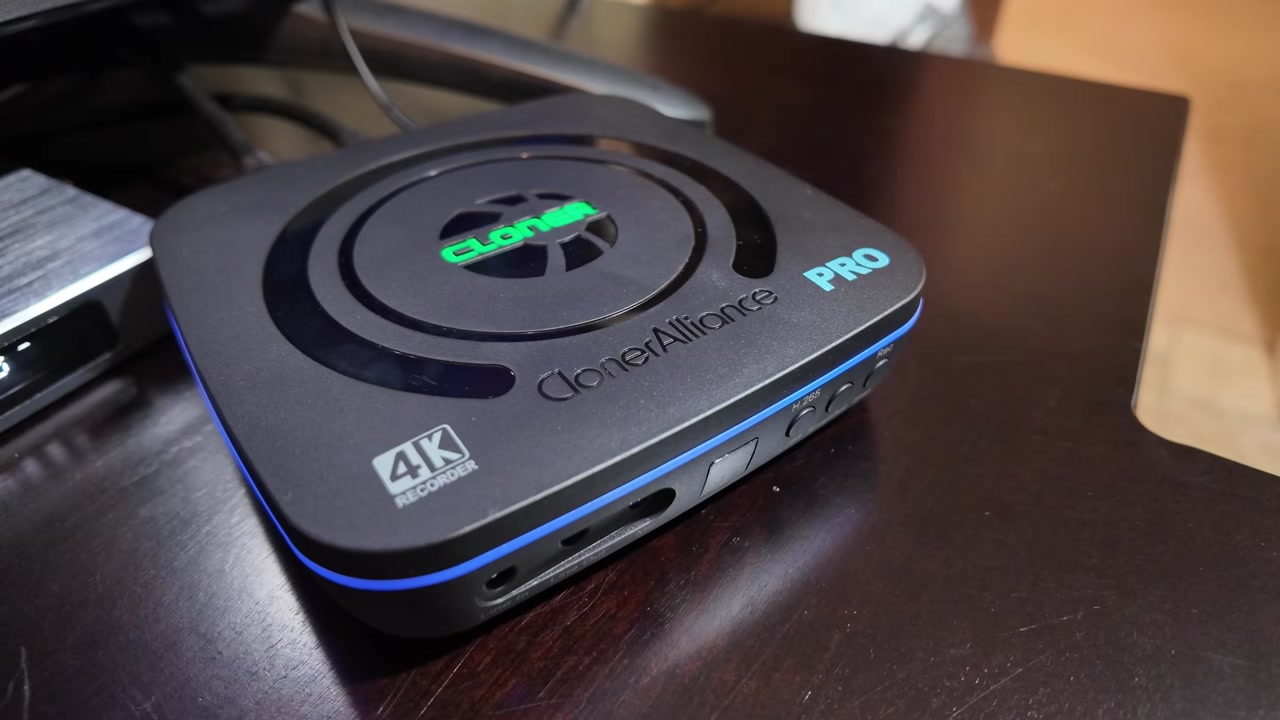
It’s the VCR my Android TV boxes never had. The ClonerAlliance UHD Pro records an HDMI source to a USB drive with one button, and it doesn’t need a PC in the path. I tested recording with a vSeeBox Elite Ultra, and I used a Digibox D6 Max for the OBS streaming test.
Full disclosure: ClonerAlliance sent me the UHD Pro free for review. It was a product exchange with no payment, and ClonerAlliance did not see this post before it was published. Links in this post are affiliate links, so I may earn a commission if you buy through them.
TABLE OF CONTENTS
- TABLE OF CONTENTS
- LINKS
- SUPPORT THE BLOG AND CHANNEL
- COMPANION YOUTUBE VIDEO
- VIDEO ERRATA
- UPDATES SINCE THE VIDEO
- WHAT’S IN THE BOX
- DESIGN AND PORTS
- POWER AND THE REMOTE
- SETUP WITH AN ANDROID TV BOX
- ONE-TOUCH RECORDING: H.264 VS H.265
- PASS-THROUGH AND LATENCY
- FILES: FINALIZING, PLAYBACK, AND NAMING
- HEAT
- BETTER BOXES FOR VHS AND RETRO CAPTURE
- THE ON-SCREEN MENU
- BITRATE AND FILE SIZE
- SCHEDULED RECORDING AND THE CLOCK
- FIRMWARE
- SNAPSHOTS AND PHOTO PLAYBACK
- PC CAPTURE MODE: OBS STREAMING TEST
- TROUBLESHOOTING
- VERDICT
- UHD HALO: COMING SOON
- SOURCES
- CONCLUSION
LINKS
Video Mention Links
- 📀 ClonerAlliance UHD Pro: https://amzn.to/3UzOnES
- 📺 vSeeBox Elite Ultra: https://vseeboxus.com/affiliate-program/sell-product?source_type=sales_plugin_af&slt=sales_plugin_af&productPage=1&referral_code=X973T43OZTN1
- 📺 Digibox D6 Max: https://tidd.ly/4vU8SKt
Other ClonerAlliance Recorders
These are the boxes I use when the source is analog. See Better Boxes for VHS and Retro Capture.
- 📀 ClonerAlliance ViewLite AV: https://amzn.to/4gvGU14
- 📀 ClonerAlliance Box Pro: https://amzn.to/4qAOn3A
- 📀 ClonerAlliance View Pro: https://amzn.to/45MhQ0R
Accessories
- 🚠 HDMI Cables: https://amzn.to/4c2vhM9
- 💾 Lexar 2TB Go Portable SSD with Hub: https://amzn.to/4ihwdRF
- 🧠 microSD Cards: https://amzn.to/3IYL3Kn
- 🔌 USB-C to Micro USB Adapter: https://amzn.to/3Wkxxrr
When you click on links to various merchants on this site and make a purchase, this can result in this site earning a commission. Affiliate programs and affiliations include, but are not limited to Amazon and the eBay Partner Network.
My Related Videos
- ViewLite AV: This Tiny Device Makes VHS Tapes & Gameplay Digital in Minutes!
- ViewLite AV short: Capture Commodore Computer Games Using the ClonerAlliance ViewLite AV
- Box Pro: Cloner Alliance Box Pro | What’s Included and What Can You Record? and the post /cloner-alliance-box-pro
- Box Pro first use: Capture Anything with the Cloner Alliance Box Pro! and the post /cloner-alliance-box-pro-first-use
- View Pro: This Gadget Records TV Like Magic!
- View Pro short: The #1 Video Capture Solution You Need!
- vSeeBox Elite Ultra: Is vSeeBox Elite Ultra Worth It in 2026? Full Unboxing!
- Digibox D6 Max: Digibox D6 Max Has a Feature Nobody is Talking About | Full Unboxing
Resources
- ClonerAlliance UHD Pro product page: https://www.cloner-alliance.com/cloneralliance-uhd-pro/
- User manual, current revision (v1.1.0): https://static.cloner-alliance.com/manual/ca-989up_user_manual.pdf
- User manual, original revision (v1.0.2, my unit): https://m.media-amazon.com/images/I/B1MLjXvNAyL.pdf
- KB, What is UHD Pro: https://www.cloner-alliance.com/help/knowledgebase/what-is-cloneralliance-uhd-pro
- KB, Main features: https://www.cloner-alliance.com/help/knowledgebase/what-are-the-main-features-of-cloneralliance-uhd-pro
- KB, Record to PC: https://www.cloner-alliance.com/help/knowledgebase/how-to-record-videos-to-pc-with-cloneralliance-uhd-pro
- Official store: https://store.cloner-alliance.com/products/cloneralliance-uhd-pro
- OBS Studio: https://obsproject.com/
SUPPORT THE BLOG AND CHANNEL
Check out the supporters page to learn about my supporters and how you can join our community. If this post saved you some time, you can also leave a tip.
COMPANION YOUTUBE VIDEO
Title: Archive, Capture, and Stream with the ClonerAlliance UHD Pro.
 Archive, Capture, and Stream with the ClonerAlliance UHD Pro
This video is on my modern tech channel, @retroCombs-tech.
VIDEO ERRATA
As of October 2026:
- Bitrate units (about 5:02). I said “16 to 20 megabytes per second.” The manual’s unit is megabits per second. On my revision the maximum is 20 Mbps. (Manual v1.0.2)
- Renaming files (3:24). I said you can’t rename on the device. That’s true for my original unit. The current revision renames from the remote (File, then Rename). (Manual v1.1.0 FAQ)
- USB capture port (6:58). I called it micro-USB, with 1080p60 as the capture maximum. That’s true for my revision. The current revision uses a USB-C 3.0 “To PC” port. (Product page, manual v1.1.0)
- Scheduling (5:20). Three time ranges is correct for my revision. The current revision allows up to five and adds a Time Zone setting. (Manual v1.1.0)
- Firmware (5:54). The public firmware page doesn’t list the UHD Pro, and the KB says to update only when support tells you to. “No feature updates” is true for my original unit. The current revision adds an on-device Firmware Update menu item. The file still comes from support. (Firmware policy, firmware downloads)
- Dimensions (1:52 overlay). The overlay said 4.5 x 4.5 x 1.75 in, 8.5 oz. The manual for my revision says 4.6 x 4.6 x 1.1 in, 8.5 oz. The current revision lists 9.45 oz, with the same footprint. (Manual v1.0.2, manual v1.1.0)
- Bitrate low/high ranges (4:44). What I said on camera (Low 4K 12–16, HD 8–12; High 4K 16–20) matches the manual’s H.265 and H.264 columns. No correction. See the table in Bitrate and File Size.
- File-size options (5:05). 16GB/3H, 4GB/3H, and 2GB/3H match the manual. Those numbers are the maximum size of one file, not the whole drive.
- Latency (2:43). I described the pass-through as no lag. The published spec is under 90 ms on the product page and under 100 ms in the KB. I didn’t measure it with a clock. (Product page, KB)
- Brand name. I said “Cloner Alliance” as two words. The official style is ClonerAlliance, one word. This post uses one word. Older posts on the site still use two.
- Video description. The description says “Affilate Links,” and “My Other Reviews: ClonerAlliance Box Pro” points at https://youtu.be/WVmw1CoG5fM. That video is the SuperBOX S7 Pro deep dive. My Box Pro videos are hUhrYNQCODY and dyCbBL9jkvQ. This post uses those links.
- Heat (3:24). I said the USB port gets hot. The manual only says the unit “may become warm.” I’m leaving my observation in Heat as a test result, not as a spec.
UPDATES SINCE THE VIDEO
ClonerAlliance has updated the UHD Pro since my unit shipped. Based on the current product page and user manual, the newer revision moves the “To PC” port to USB-C 3.0, raises the maximum bitrate to 50 Mbps, lets you rename files from the remote, allows up to five schedules plus a Time Zone setting, and adds a Firmware Update menu item. I haven’t tested the newer revision, so everything below describes my original unit.
ClonerAlliance has also released a separate model, the UHD Halo. My video on it is coming soon to @retroCombs-tech (details below).
| My unit (original) | Current UHD Pro (per ClonerAlliance) | |
|---|---|---|
| To PC port | micro-USB | USB-C 3.0 |
| Max bitrate | 20 Mbps | 50 Mbps |
| Rename on device | No | Yes |
| Schedules | 3 | 5, plus a Time Zone setting |
| Firmware Update menu | No | Yes |
| Weight | 8.5 oz | 9.45 oz |
WHAT’S IN THE BOX
The box has the recorder, the remote, a barrel-jack power supply, an HDMI cable, a micro-USB cable, and the full user guide.
DESIGN AND PORTS
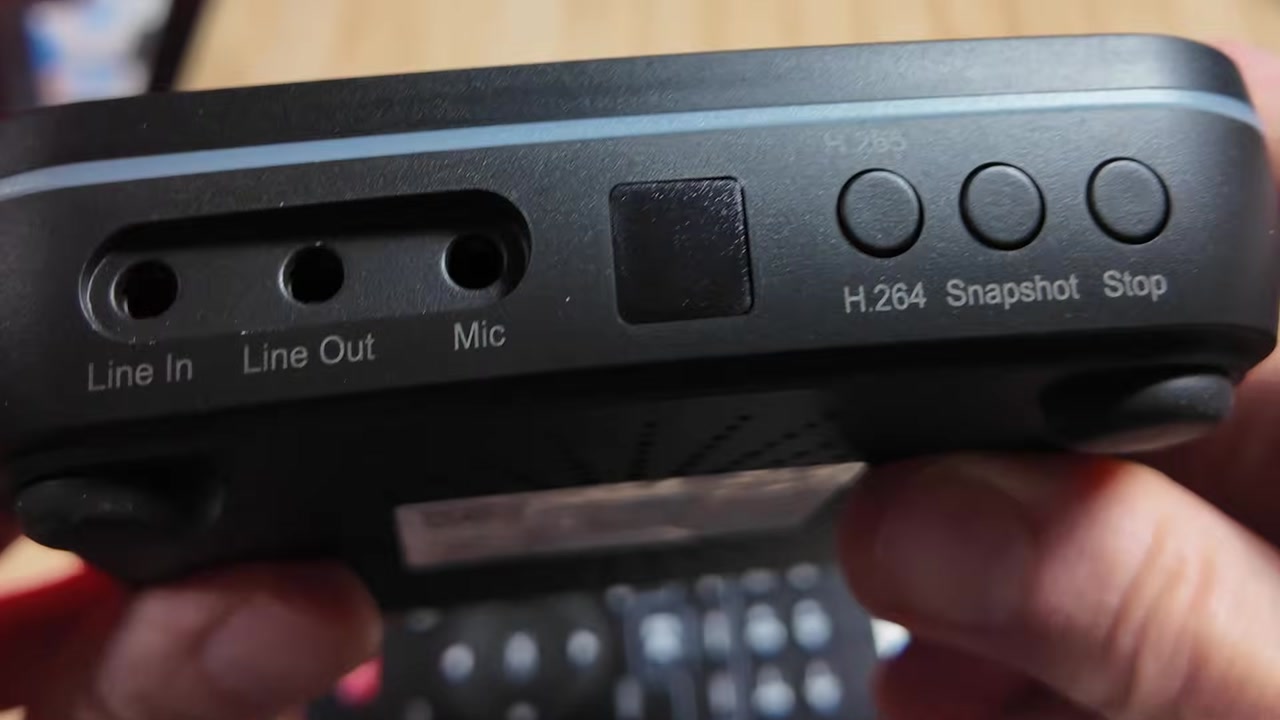
My unit is 4.6 x 4.6 x 1.1 in and weighs 8.5 oz, from manual v1.0.2. The HDMI IN and OUT ports are mounted upside down relative to a typical player. The front has Line In, Line Out, Mic, a USB storage port, and the H.264, Snapshot, and Stop buttons.
On my revision the status ring shows the codec. Blue means H.264. Green means H.265. That’s the side-indicator table in the original manual.
POWER AND THE REMOTE
The remote has no power button. The unit uses a push switch, and it takes about 15 seconds to boot.
Tip: A smart plug, including one tied to Home Assistant, gets around the push switch. That’s how I power mine. I don’t have an affiliate link for a specific plug, so I’m not linking one here.
SETUP WITH AN ANDROID TV BOX
The path is simple. The source goes into HDMI IN, the TV comes off HDMI OUT, and the drive goes in the front USB port.
Note: Plug the USB drive or TF card in before you power the unit on. If the drive isn’t seen, power off, insert it, and boot again. (Manual FAQ)
ONE-TOUCH RECORDING: H.264 VS H.265
Pick the codec with the front button or the menu. One press starts recording. I didn’t see a pause before the file started. H.265 makes the smaller file. H.264 plays on almost anything I plug the drive into.
Note: The codec choice needs storage connected. Without a drive, the button doesn’t switch modes. (Manual FAQ)
From the bitrate table, H.265 is about 25% lower than H.264 at the same Low or High setting. I use H.264 when the file has to play on an older TV or editor.
PASS-THROUGH AND LATENCY
On my set I didn’t notice lag between the source and the TV. The published spec is under 90 ms (product page) or under 100 ms (KB). I didn’t measure it.
On my revision, a 4K60 input passes through and records at 1080p60. A 4K30 or 4K24 input can record in 4K. That’s the resolution chart in the original manual.
Tip: For a 4K movie, set the player to 4K24 or auto frame rate so the file matches the content. The current listing also says to turn HDR and Dolby audio off on the source while recording. That note is written for the current model, so I treat it as a maybe on older units. (Manual FAQ, product page)
FILES: FINALIZING, PLAYBACK, AND NAMING
The file finishes writing after you stop the recording. Mine played in QuickTime on a Mac with no conversion. On my unit the names are REC_001.mp4 and so on, and there is no rename command on the device. The current revision can rename from the remote.
Tip: If you rename a file on a computer, keep the
RECprefix, and keepIMGon snapshots. The original manual says the UHD Pro will not play the file back without that prefix.
HEAT
On long recordings, the USB storage connector on my unit gets hot. The body of the recorder stays warm. That’s my test result. The manual only says the unit may become warm. It doesn’t call out the connector.
BETTER BOXES FOR VHS AND RETRO CAPTURE
The UHD Pro is HDMI only. It has no analog input and no aspect-ratio control, so it is the wrong box for VHS tapes, camcorders, or retro computers. I’m not going to describe a converter workaround. These are the boxes I’ve used for that job. The notes below come from my own videos, not from a port-by-port spec sheet.
- ClonerAlliance ViewLite AV. Small and portable. I tested it with a Commodore 128 in C64 mode. This Tiny Device Makes VHS Tapes & Gameplay Digital in Minutes!. Short: Capture Commodore Computer Games Using the ClonerAlliance ViewLite AV.
- ClonerAlliance Box Pro. I recorded from a Fire TV Stick and from a Commodore Plus/4. Cloner Alliance Box Pro | What’s Included and What Can You Record? and the post /cloner-alliance-box-pro. Capture Anything with the Cloner Alliance Box Pro! and the post /cloner-alliance-box-pro-first-use.
- ClonerAlliance View Pro. A standalone box with a 7 in screen. I used it with the vSeeBox Elite Ultra as well as with older gear. This Gadget Records TV Like Magic!. Short: The #1 Video Capture Solution You Need!.
Affiliate links for these three are in Other ClonerAlliance Recorders.
THE ON-SCREEN MENU
The menu has five items: Record settings, Schedule settings, System settings, Video playback, and Photo playback.
BITRATE AND FILE SIZE
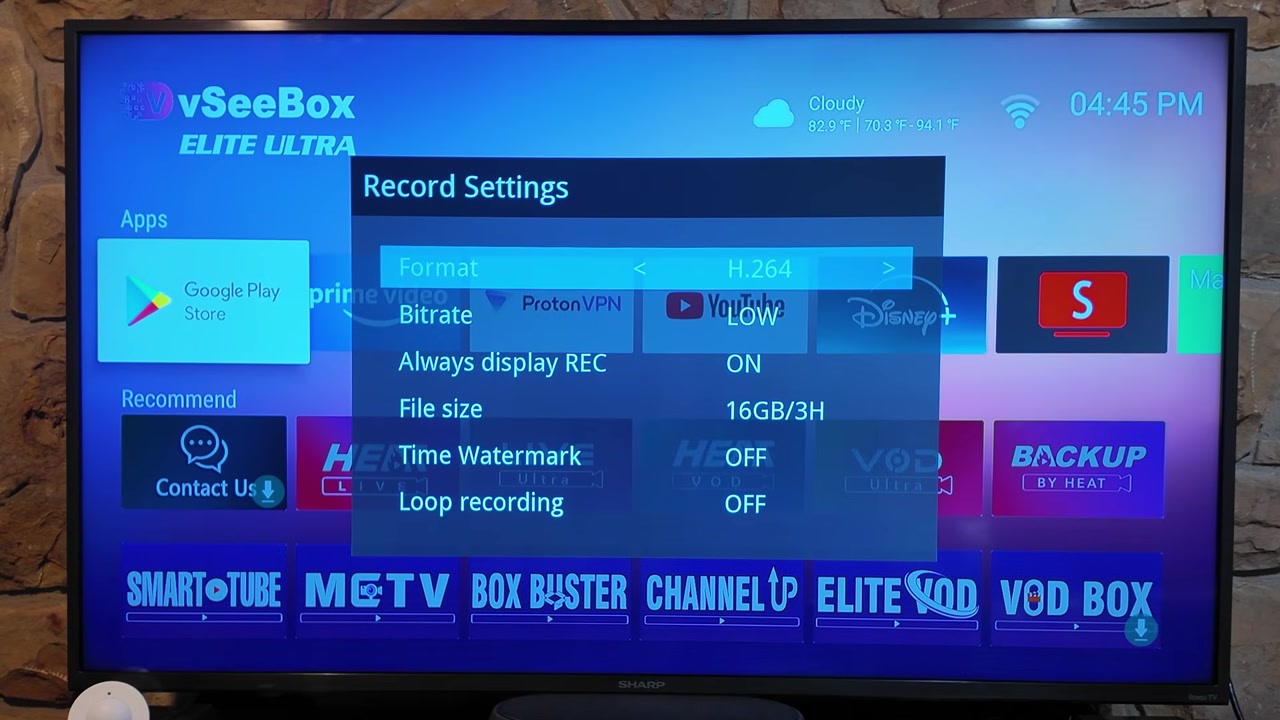
These rates are from the original manual, in Mbps. Low and High are the menu settings. Each cell is 4K, then 1080p, then 720p, then SD.
| Setting | H.264 | H.265 |
|---|---|---|
| Low | 4K 16 / 1080p 12 / 720p 8 / SD 4 | 4K 12 / 1080p 8 / 720p 6 / SD 4 |
| High | 4K 20 / 1080p 16 / 720p 12 / SD 8 | 4K 16 / 1080p 12 / 720p 8 / SD 4 |
The file-size options are 16GB/3H, 4GB/3H, and 2GB/3H. Each one is the maximum for a single file. Recording continues in a new file. MP4-Cloner on Windows can join them, and so can any editor.
Tip: FAT32 caps a file at 4 GB. exFAT and NTFS split at about 16.7 GB, or at 3 hours. Use exFAT for long recordings. Drives over 2 TB need exFAT, or they need to be partitioned. (Manual FAQ)
The Record Settings screen also has Always display REC, a time watermark, and loop recording. I didn’t cover those on camera.
Tip: Turn Always display REC off if the REC badge on the TV bothers you. The manual describes it as a TV-output option. I have not checked whether that badge is burned into the file, so I won’t claim that it is.
Tip: Loop recording ON overwrites the oldest files when the drive fills. OFF stops recording when the drive is full. (Manual)
SCHEDULED RECORDING AND THE CLOCK
My unit can record Once or Every Day, with up to three time ranges. There is no network connection, so the clock does not set itself. Set System time by hand before you make a schedule. The current revision adds a Time Zone setting and allows five ranges.
Tip: Set the clock before you make a schedule. A schedule built on the default clock will fire at the wrong time. (Manual)
FIRMWARE
ClonerAlliance’s public firmware page does not list the UHD Pro. The KB says units ship with current firmware and that you should not update unless support tells you to. Support sends the file when you ask. My unit reports K.3.07.202106171500 and has not had a feature update. That “no feature updates” line is about my original unit, and it is still true for that unit.
The current revision’s manual adds a Firmware Update item in the menu, described as being for the latest features and improvements. The file still comes from support. (Firmware policy)
SNAPSHOTS AND PHOTO PLAYBACK
The Snapshot button saves a JPG. You view it on the TV under Photo playback.
PC CAPTURE MODE: OBS STREAMING TEST
The micro-USB port marked “To PC” shows up on macOS as a UVC/UAC device named “CA-989UP UVC”. I didn’t install a driver. In OBS, add a Video Capture Device and pick CA-989UP UVC. On my revision that input is 1920x1080 at 60 fps. I streamed a Digibox D6 Max through it. The on-screen menu does not appear over USB.
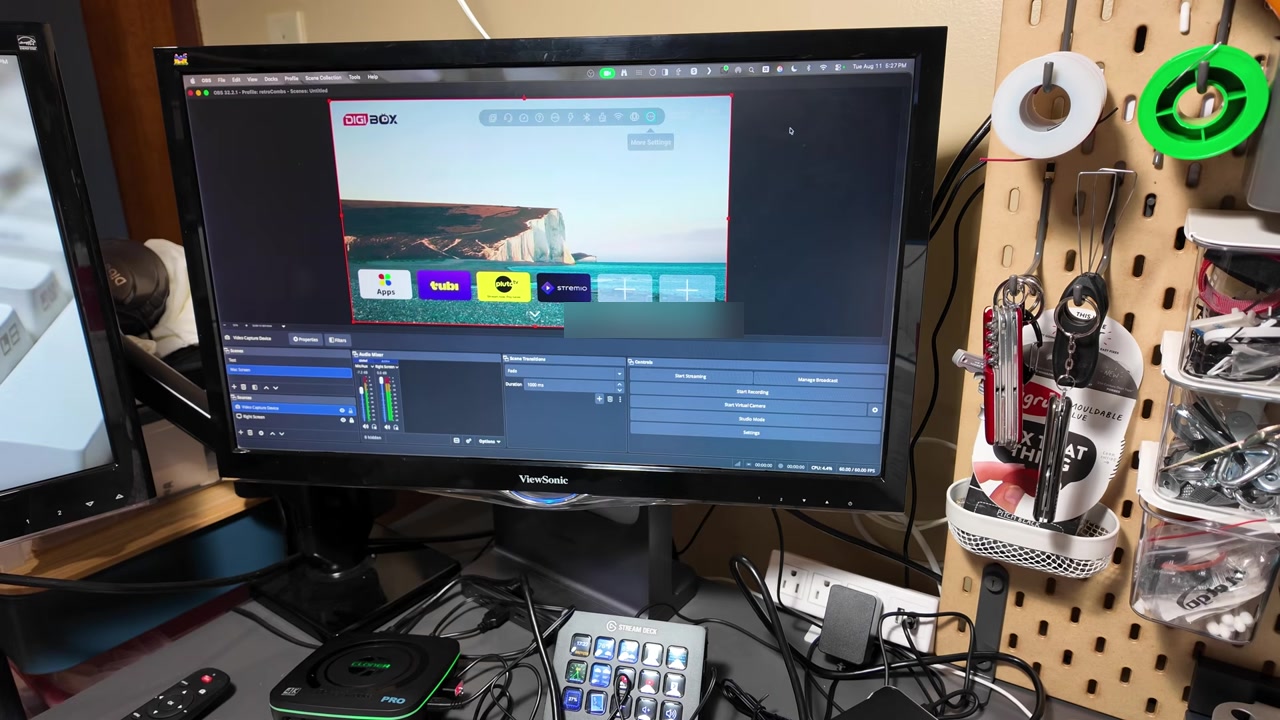
The KB steps, shortened:
- Connect the “To PC” cable to the computer.
- Open OBS and add a Video Capture Device source.
- Choose CA-989UP UVC.
- Set the resolution. On my revision, 1920x1080 at 60 fps is the capture mode.
Tip: The on-screen display stays on the TV. It does not show up in the USB picture. (Manual)
On a USB-C-only Mac, a USB-C to Micro USB adapter handles my unit’s micro-USB “To PC” port. The link is in Accessories. The current revision’s port is USB-C already, so that adapter is for the original unit.
TROUBLESHOOTING
- Black screen, “Unsupported content,” or an error message. The source is sending HDCP-protected video. ClonerAlliance products don’t capture that. The manual and the official blog describe this as expected, not a defect. (Official blog)
- Smart TV apps won’t record. A TV is a display, not a source. Use an external stick or box. Antenna and smart-TV apps are listed as unsupported sources. (Product page, official blog)
- The top LED blinks blue and green. There is no input, or the input resolution isn’t supported. Check the source output against the resolution chart. (Manual)
- The side LED is off, or the drive isn’t detected. The unit doesn’t see storage. Plug the drive in before power-on and reboot. (Manual FAQ)
- The recording splits into several files. That’s the file-size limit: 4 GB on FAT32, about 16.7 GB or 3 hours on exFAT and NTFS. Join the parts with MP4-Cloner on Windows, or with any editor. (Manual FAQ)
- Judder on 4K movies. The source frame rate doesn’t match the content. Set the player to auto frame rate or 4K24. (Manual FAQ)
- The device doesn’t appear in OBS or Device Manager. Reconnect the USB cable and look for “CA-989UP UAC” or “CA-989UP UVC”. (Manual)
VERDICT
The UHD Pro is a straightforward HDMI recorder for an Android TV box. It is not the box I reach for when the source is retro or analog. Those jobs are in Better Boxes for VHS and Retro Capture. I love mine and I use it regularly.
On October 24, 2026, the official store listed it at $278.50, down from a $349.99 list price. Prices change. (Official store)

UHD HALO: COMING SOON
Coming soon: ClonerAlliance UHD Halo. ClonerAlliance’s UHD Halo is a separate standalone recorder that lists 4K60 recording, an HDMI 2.0 input, a USB-C DisplayPort Alt Mode input for phones, tablets, and laptops, and 65W pass-through charging for the connected device (ClonerAlliance specs). My video on it is coming soon to @retroCombs-tech.
SOURCES
Checked October 24, 2026:
- Product page (current revision): https://www.cloner-alliance.com/cloneralliance-uhd-pro/
- User manual, current (v1.1.0): https://static.cloner-alliance.com/manual/ca-989up_user_manual.pdf
- User manual, original revision (v1.0.2): https://m.media-amazon.com/images/I/B1MLjXvNAyL.pdf
- KB, What is UHD Pro: https://www.cloner-alliance.com/help/knowledgebase/what-is-cloneralliance-uhd-pro
- KB, Main features: https://www.cloner-alliance.com/help/knowledgebase/what-are-the-main-features-of-cloneralliance-uhd-pro
- KB, Record to PC: https://www.cloner-alliance.com/help/knowledgebase/how-to-record-videos-to-pc-with-cloneralliance-uhd-pro
- KB, Firmware policy: https://www.cloner-alliance.com/help/knowledgebase/shall-i-update-the-product-firmware-once-after-receiving-the-product
- Firmware downloads (UHD Pro is not listed): https://www.cloner-alliance.com/help/download/firmware/
- HDCP and smart-TV source note: https://www.cloner-alliance.com/blog/post/cloneralliance-standalone-video-recorders-support-external-media-sticks/
- Official store: https://store.cloner-alliance.com/products/cloneralliance-uhd-pro
- OBS Studio: https://obsproject.com/
- UHD Halo specs: https://www.cloner-alliance.com/help/knowledgebase/technical-specifications-of-cloneralliance-uhd-halo
- UHD Halo product page: https://www.cloner-alliance.com/cloneralliance-uhd-halo/
- UHD Halo manual: https://static.cloner-alliance.com/manual/ca-989uh_user_manual.pdf
- My videos are linked in My Related Videos and in Better Boxes for VHS and Retro Capture.
CONCLUSION
That’s the UHD Pro I have: one button, a USB drive, and an HDMI path from an Android TV box to the TV. The newer revision changes the PC port, the bitrate ceiling, and a few menu items, and I haven’t tested that revision. The UHD Halo is a different product, and the video for it isn’t up yet.
If this post helped, leave a tip.
That’s it for me, folks. 🕹️ retroCombs, OUT!
Comments
Comments use GitHub Discussions; sign in with GitHub to join in.